 6b0100fd61
* Add and remove libs and components for Arduino Core 3

* Arduino Core 3

* Add back Solo1

* Change ESP32-S3 to 4MB build

* Update README.md

* Fix retain and number of retries

* Fix rolling log

* Fix defaults

* Fix BleScanner on Solo1

* Export settings

* Import settings

* Fix HA Battery voltage

* Change submodule

* Update espMqttClient and AsyncTCP

* Webserial and MQTT/Network reconnecting

* Update nuki_ble

---------

Co-authored-by: iranl <iranl@github.com>
2.3 KiB
2.3 KiB
WebSerialLite



WebSerial is a Serial Monitor for ESP32 that can be accessed remotely via a web browser. Webpage is stored in program memory of the microcontroller.
This fork is based on asjdf/WebSerialLite.
Changes in this fork
- Simplified callbacks
- Fixed UI
- Fixed Web Socket auto reconnect
- Fixed Web Socket client cleanup (See
WEBSERIAL_MAX_WS_CLIENTS) - Command history (up/down arrow keys) saved in local storage
- Support logo and fallback to title if not found.
- Arduino 3 / ESP-IDF 5.1 Compatibility
- Improved performance: can stream up to 20 lines per second is possible
To add a logo, add a handler for /logo to serve your logo in the image format you want, gzipped or not.
You can use the ESP32 embedding mechanism.
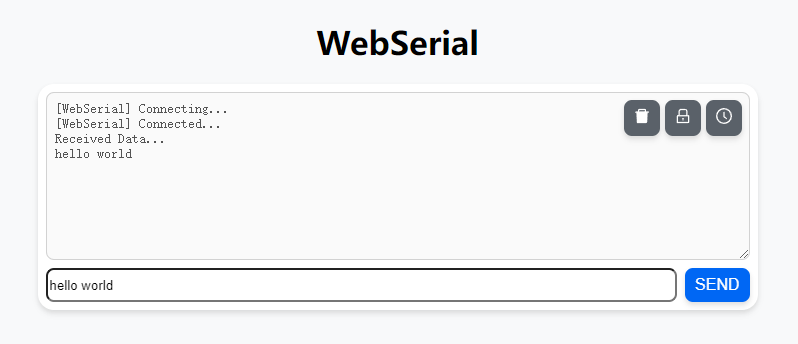
Preview
Features
- Works on WebSockets
- Realtime logging
- Any number of Serial Monitors can be opened on the browser
- Uses Async Webserver for better performance
- Light weight (<3k)
- Timestamp
- Event driven
Dependencies
Usage
  WebSerial.onMessage([](const String& msg) { Serial.println(msg); });
  WebSerial.begin(server);

  WebSerial.print("foo bar baz");
If you need line buffering to use print(c), printf, write(c), etc:
  WebSerial.onMessage([](const String& msg) { Serial.println(msg); });
  WebSerial.begin(server);

  WebSerial.setBuffer(100); // initial buffer size

  WebSerial.printf("Line 1: %" PRIu32 "\nLine 2: %" PRIu32, count, ESP.getFreeHeap());
  WebSerial.println();
  WebSerial.print("Line ");
  WebSerial.print(3);
  WebSerial.println();